./grafana_log_ripper -monitoring_plugin -in golang

First, I hope everyone is staying safe during these times!
I’ve been busy chillax’n but I thought I would start a new project. So with my current use of Grafana,
InfluxDB, and Telegraf (as you all have seen in my previous posts) I wanted to expand on my monitoring
knowledge by learning a new language. So I wrote a GoLang application!
TL;DR
This application will take a file/directory as input and parse the log file/files for errors, and send
them to the InfluxDB endpoint on my Raspberry Pi.
Summary and Plans
I have Open Sourced it and added releases, with a few supported OS’s (MacOS, Windows, Linux, Linux ARM).
I have intentions on writing a plugin and submitting a pull request to the Telegraf repo to add it once
I become more comfortable with Go. However, for now I am on my own. So the source code can be found here
–> log_ripper <–
The code
Lets dig into the learning experience I had writing this. It does take arguments when ran, however it is not a command line tool, and I did not think this project needed flags to get the job done. So I created two separate GoLang packages, Parser and Poster.
Parser
This is exactly what it says, we need to scrape the logs for errors right? So here is what I did to do that.
(Read code comments for an explanation of the code)
package parser

import (
	"fmt"
	"io/ioutil"
	"regexp"
)

// regexSearch will search the file passed int the function and
// return the number of errors in the file
func regexSearch(regFile string) int {
	r, _ := regexp.Compile("[eE][rR]{2}[oO][rR]")
	results := r.FindAllString(string(regFile), -1)
	return len(results)
}

// ParseLogFile opens file, and parses for errors and
// returns the number of errors in that file
func ParseLogFile(fileName string) int {
	logFile, _ := ioutil.ReadFile(fileName)

	res := regexSearch(string(logFile))
	return res
}

// ParseLogDir parses every file in the directory
// adds all of the errors and returns the sum
func ParseLogDir(dirName string) int {
	var totalErrors int
	logDir, err := ioutil.ReadDir(dirName)
	for _, dirLogFile := range logDir {
		logFileName, _ := ioutil.ReadFile(dirName + "/" + dirLogFile.Name())

		results := regexSearch(string(logFileName))
		totalErrors = totalErrors + results
	}

	if err != nil {
		fmt.Println(err)
	}

	return totalErrors
}
There are some improvements I could make but I want to add support for both total errors in a Directory
and total errors for each file in that directory and send that to InfluxDB 
Poster
This will send metrics to the InfluxDB endpoint. It takes a few parameters to work such as; the InfluxDB host/IP followed by the port, the name of the database, the database username and the database password, along with the error count.
package poster

import (
	"fmt"
	"io/ioutil"
	"net/http"
	"os"
	"strconv"
	"strings"
	"time"
)

//Poster sends data to the influxdb endpoint, and requires the host/ip addr:<port>
// database name, database username, database password
func Poster(host string, databaseName string, databaseUser string, databasePass string, errorCount int) []byte {
	var client = &http.Client{}
	var currentTime = strconv.FormatInt(time.Now().Unix(), 10)
	var hostname, _ = os.Hostname()
    var postURL string = "http://" + host + "/write?db=" + databaseName
    var newErrorCount string = strconv.Itoa(errorCount)

    // This is the "payload" we will be sending the DB
    var data = strings.NewReader(`log_errors,host=` + hostname + ` value=`
                                 + newErrorCount + ` ` + currentTime + `000000000`)

    // here we specify our post request to the endpoint, and the data along with the Auth header
    r, err := http.NewRequest("POST", postURL, data)
    r.Header.Set("Authorization", "Token "+databaseUser+":"+databasePass)
    if err != nil {
		fmt.Println(err)
    }

    // Here is where we actually send the request
	resp, err := client.Do(r)
	if err != nil {
		fmt.Println(err)
	}

    // This reads the request response
	bodyText, err := ioutil.ReadAll(resp.Body)
	if err != nil {
		fmt.Println(err)
	}
	return bodyText
}
So my GoLang experience was very slim before starting this project, and it has taught me a lot in the past couple of days.
Not only about GoLang but how the time series database works as well. This brings us to the main program itself,
this really is just the control flow of this project.
Main
In this we are specifying the arguments, giving a little usage if the args are not met, and then testing if the path specified by the user is a directory or a file and acting upon that.
package main

import (
	"fmt"
	"os"
	"parser"
	"poster"
)

func main() {
	var numberOfErrors int
	if len(os.Args) != 6 {
		fmt.Println("\n\nUsage: \n>> log_ripper <path to logs> <hostname/url and port> <database name> <database username> <database password>\n\n")
		fmt.Println("\nExample: \n>> log_ripper /var/log/messages 192.168.1.10:8086 mydb myuser mypass")
	}

    // Args, could probably be a struct, but I am a noob.
	pathToLogs := os.Args[1]
	databaseHost := os.Args[2]
	databaseName := os.Args[3]
	databaseUser := os.Args[4]
	databasePass := os.Args[5]

	testPath, err := os.Stat(pathToLogs)
	if err != nil {
		fmt.Println(err)
	}

    // Runing the parser functions for a Directory or just a file and then sending metrics.
	if testPath.IsDir() {
		numberOfErrors = parser.ParseLogDir(pathToLogs)
		fmt.Println(numberOfErrors)
		poster.Poster(databaseHost, databaseName, databaseUser, databasePass, numberOfErrors)
	} else {
		numberOfErrors = parser.ParseLogFile(pathToLogs)
		fmt.Println(numberOfErrors)
		poster.Poster(databaseHost, databaseName, databaseUser, databasePass, numberOfErrors)
	}

}
What did I learn
I learned mostly everything you see above, I started with GoLang a week or two ago, I know my package imports
aren’t correct, and there are a few things that I could change to meet “standards”, however it has been a
learning curve. I could have written this in Python, and been content with it, but the ability to write the same code
and package it for different OS’s is pretty neat, it makes supporting things like this easier. Also, the feeling of accomplishment is greater after learning something new 
Demo/Links
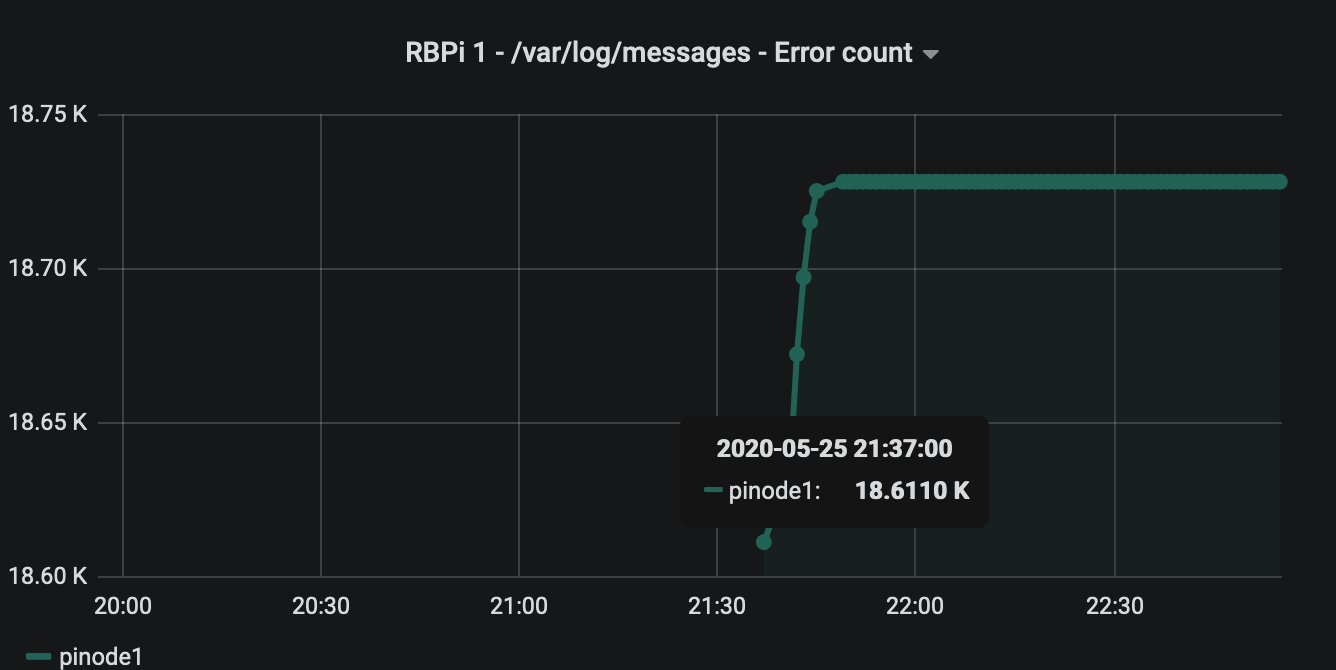
This is the scheduled job that send the data to make the pretty graph above!
*/1 * * * * /bin/grafana_log_ripper /var/log/messages 192.168.1.10:8086 <DB Name> <DB User> <DB Pass>
If you are running grafana and influxdb and wanna try this here are the steps!
1) Get the binary for your OS HERE
2) Make the file executable on your system and move it to a shared location.
3) schedule a job with the above parameters like this.
/bin/grafana_log_ripper <log file> <db ip address:<db port> <DB Name> <DB User> <DB Pass>